
AI Workflow Automation for Business in 2026: Best Tools, Use Cases and ROI
Introduction
Most businesses are not struggling because they lack AI tools. They are struggling because work is still trapped in inboxes, spreadsheets, approvals, tickets, and disconnected systems. In 2026, the winners are not the companies with the loudest AI announcements. They are the companies that use AI workflow automation to reduce delay, remove manual handoffs, and move work from request to result faster.
If you are a business owner, operator, or team leader, the real question is not whether AI matters. The real question is which workflows are worth automating first, which platform fits your business, and how quickly you can see measurable ROI.
AI workflow automation for business means using AI and automation together to run multi-step work across your systems, people, and data. Instead of only generating text, the system can classify requests, fetch information, make routine decisions, trigger actions, route approvals, and escalate exceptions to a human when needed.

What AI workflow automation means
Traditional automation follows fixed rules. AI workflow automation adds judgement to the process. That matters when the input is messy, the path changes, or the task depends on context.
A simple automation can move a form submission into a CRM. An AI workflow can read the enquiry, identify urgency, enrich the lead, choose the right sales queue, draft a follow-up, and log everything back into the system.
That is why AI workflow automation is becoming a board-level priority. It sits between basic task automation and full agentic execution. For most businesses, it is the fastest path to real operating leverage because it improves existing workflows instead of forcing a complete system rebuild.
Why this matters now
The market has moved past the stage where AI was treated as a chatbot experiment. Business leaders now want production outcomes. Enterprise adoption is scaling, and the organisations capturing value tend to be the ones that combine AI with operating discipline, human validation, data readiness, and governance.
This is also why so many AI projects disappoint. AI layered on top of a broken process usually creates faster chaos. AI attached to a measurable bottleneck can create faster throughput, lower cost, and better service.
That pattern shows up in both executive research and operator conversations. Leaders are asking about ROI, safe scale, and workflow impact, while practitioners keep pointing to the same practical wins: lead qualification, reporting, support triage, invoice handling, case routing, and knowledge-heavy internal operations.
How to choose the right workflows first
The best place to start is not the flashiest use case. It is the workflow with these five traits:
High volume. Repetitive work creates compounding gains.
Cross-system friction. If teams keep copying data between CRM, email, ERP, help desk, spreadsheets, and chat tools, automation can remove expensive handoffs.
Clear inputs and outputs. The workflow should have an obvious trigger, a defined outcome, and a visible owner.
Measurable pain. If you cannot measure time, error rate, backlog, conversion, or cost before automation, you will struggle to prove value after launch.
Low-regret decisions. Start where AI can assist classification, routing, summarisation, drafting, reconciliation, or exception detection before you let it take more autonomous action.
A practical rule is simple: automate bottlenecks before you automate ambition. That matches what operators keep reporting in public discussions. AI is worth it when it removes a real operational choke point. It is a poor investment when it is added on top of undefined processes or high-risk judgement calls with no clear ownership.
Best AI workflow automation tools

There is no single best tool for every business. The right platform depends on your stack, your technical maturity, your governance requirements, and how much control you need over logic and data.
Zapier
Best for teams that want the fastest no-code rollout across a very large app ecosystem. Zapier is strong when the goal is to connect business apps quickly, launch AI-assisted workflows without engineering dependency, and give non-technical teams a fast path to value. Its biggest strength is breadth and speed. It is especially good for sales, marketing, productivity, lightweight service workflows, and founder-led operations.
Make
Best for visual multi-step orchestration where workflows are more complex than a simple trigger-and-action setup. Make is a strong fit for teams that want visibility into how AI decisions, systems, and steps connect. It is useful when a workflow spans CRM, support, email, documents, and databases but still needs to remain understandable to operations teams.
n8n
Best for businesses that want deeper control, self-hosting options, flexible logic, and a more developer-friendly foundation. n8n is especially strong when privacy, custom logic, legacy systems, on-prem deployment, or AI governance matter. It suits technical teams that want to combine low-code speed with custom code and infrastructure control.
Microsoft Power Automate
Best for organisations already invested in Microsoft 365, Teams, SharePoint, Dynamics, Power Platform, and Windows-based automation. Power Automate is a natural choice when the business wants Copilot-assisted flow creation, process mining, approvals, and enterprise productivity workflows inside the Microsoft ecosystem.
Workato
Best for enterprise orchestration across large application estates where governance, approvals, resilience, and operational visibility are non-negotiable. Workato is a strong fit for larger organisations running processes across ERP, HR, finance, service, and data systems.
UiPath
Best for high-volume enterprise automation where AI needs to work alongside robots, people, and governed business processes. UiPath is particularly strong for finance, procurement, document-heavy operations, invoice handling, and complex enterprise workflows that require orchestration and control.
The cleanest way to choose is this: choose Zapier for speed, Make for visual orchestration, n8n for control, Power Automate for Microsoft-native operations, Workato for enterprise integration governance, and UiPath for heavy-duty automation at scale. That positioning aligns with the official capabilities each platform is emphasising in 2026.
Highest-ROI use cases
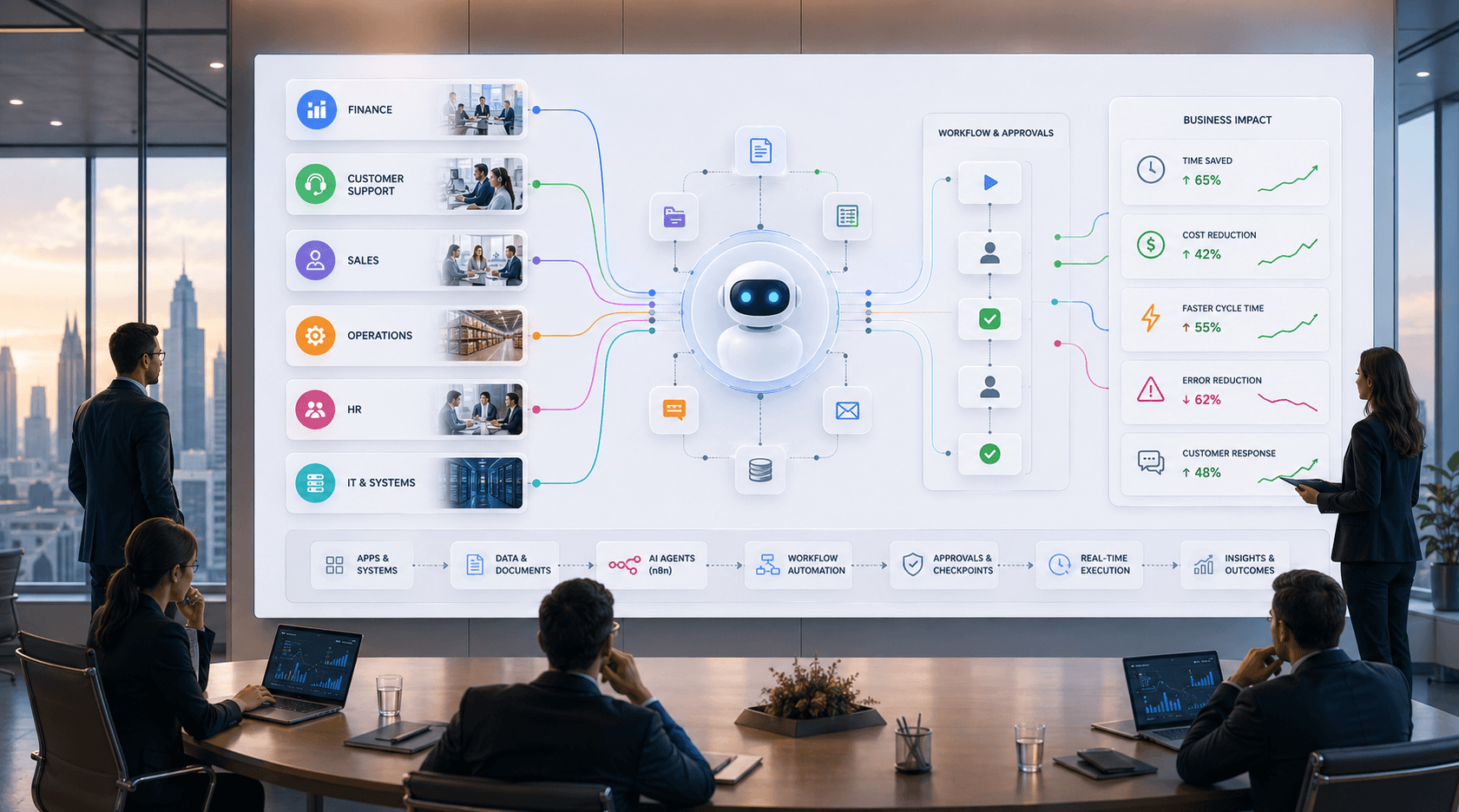
The most reliable returns rarely come from broad “AI transformation” projects. They come from targeted workflows where there is too much manual review, too many handoffs, or too many repetitive decisions.
Sales and lead operations are one of the strongest starting points. AI can enrich leads, classify intent, route opportunities, draft replies, summarise calls, and keep pipeline data cleaner. This reduces admin drag and helps sales teams spend more time on qualified opportunities.
Customer support is another high-return area. AI workflows can classify tickets, detect urgency, retrieve knowledge, summarise long threads, draft responses, and route issues to the right queue. The value is usually visible in response times, backlog reduction, and support consistency.
Finance operations remain one of the most proven categories. Invoice capture, reconciliation, dispute handling, approvals, and contract-related reviews combine structured systems with unstructured documents, which makes them ideal for AI-assisted workflow automation when guardrails are in place.
HR and employee operations also deliver quick wins. Recruiting triage, interview scheduling, onboarding steps, policy Q&A, leave processing, and internal knowledge access all benefit from automation that reduces back-and-forth without removing human oversight where it matters.
Internal reporting and knowledge work are often underrated. Many businesses still lose time to chasing updates, manually compiling weekly reports, summarising meetings, and routing tasks after decisions are made. AI workflow automation can reduce that invisible operational tax.
Real-world vendor case studies show why this matters. Microsoft highlights customers achieving 248% ROI over three years in a Forrester-backed study and customer stories showing major time and cost savings with Power Automate. n8n documents outcomes such as more than 1,000 hours of manual work saved at Huel and support operations automating 70% of payment tickets at Koralplay. UiPath publishes finance and procurement stories including 60,000 hours saved yearly at NTT Communications and same-day review outcomes in other document-heavy processes.
How to measure ROI
The simplest mistake in AI automation is measuring excitement instead of economics.
Use this practical formula:
ROI = (time saved + cost avoided + error reduction + revenue uplift − total platform and implementation cost) / total cost
For most businesses, the easiest model starts with labour hours saved. Multiply the hours removed from manual work by the true loaded hourly cost of the role, then add any direct savings from fewer errors, fewer software subscriptions, faster cycle times, or more conversion from improved follow-up and routing.
Do not stop at “hours saved”. Ask what happens to those hours. If the saved time only creates idle capacity, the ROI is weaker. If it increases sales throughput, reduces backlog, shortens finance close, or improves service quality, the ROI is much stronger.
Also measure risk and control. Good AI workflow automation should reduce missed handoffs, improve auditability, and make approvals visible. That matters because production AI succeeds when outputs are governed and exceptions are managed, not when teams blindly trust the model. High-performing organisations are more likely to define where human validation is required and how outputs should be reviewed.
Common mistakes to avoid
Do not start with the most ambitious workflow. Start with the most measurable one.
Do not automate a process that has no owner. AI will expose unclear ownership faster than it fixes it.
Do not pick a platform only because it is popular. Pick it because it matches your systems, governance needs, and builder skill level.
Do not hand high-risk decisions to AI without approvals, policies, and escalation rules.
Do not treat the model as the product. The real product is the end-to-end workflow, including triggers, permissions, exceptions, monitoring, and human review.
That last point is the biggest separator between pilot theatre and real results. Enterprise agent and orchestration platforms are now competing heavily on guardrails, approvals, observability, policy control, and operational visibility because that is what production workflows actually need.
Conclusion
AI workflow automation for business is no longer about adding a chatbot and hoping for transformation. The real opportunity is to redesign how work moves through your business.
If you want fast wins, start with a painful, repetitive, measurable workflow. If you want durable wins, choose a platform that matches your business model, your systems, and your governance requirements.
The businesses that win in 2026 will not be the ones using the most AI tools. They will be the ones using the right automation architecture to move work faster, reduce operational drag, and prove value in numbers the leadership team actually cares about.